 Transitour

How to Use the Transitour Dispatch Board: Daily Operations Guide
Keeping track of daily transport operations means knowing what is happening now, which resources are available and which services still need attention. In this Transitour Guide, we show you how to use the Dispatch Board to bring that information together.
Watch the video: How to Use the Transitour Dispatch Board
Follow your daily services from one screen
The Dispatch Board gives operations teams a central view of the services planned for the day.
Bookings are organised by operational status, making it easier to identify which services are already assigned and which still require action. Each service also presents key information such as the customer, time, route and passenger numbers.
If more detail is needed, you can open the booking directly to review the route, assignments and other service information.
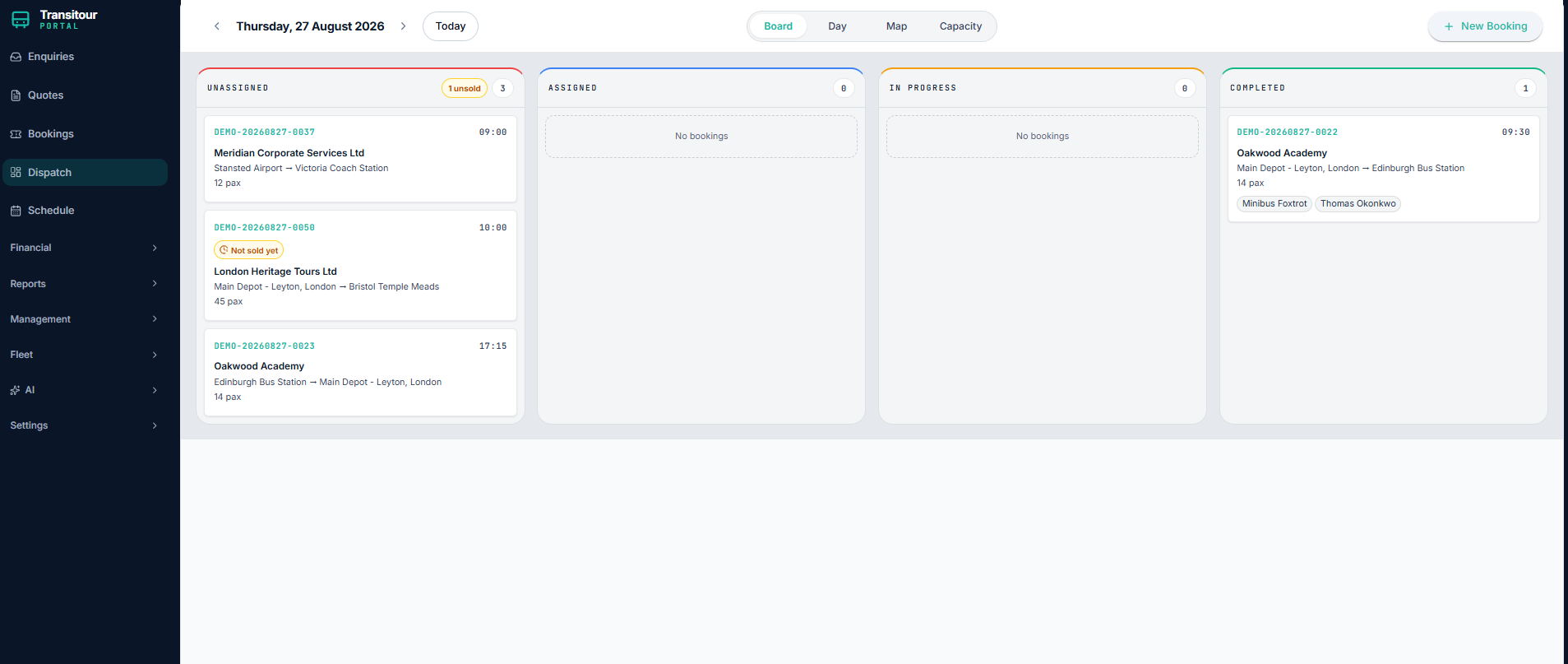
The Dispatch Board brings daily services and operational status together in one view.
Check vehicle and driver availability throughout the day
The Day view focuses on resource availability. It shows vehicles and drivers across a daily timeline, helping the operations team understand when each resource is available and when it is already assigned.
This makes it easier to identify available time slots, occupied resources and potential conflicts before allocating another service.
See operations from a geographical perspective
The Map view adds geographical context to the daily operation. By selecting a service, the team can review its route and the relevant pickup and destination points.
Combining timing, resource availability and location information gives dispatchers a clearer picture when several services are running or being prepared at the same time.
Review capacity before problems arise
The Capacity view provides a day-by-day overview of available vehicles and drivers. It helps teams see how many resources remain available, which are already committed or reserved, and whether any services are still waiting for an assignment.
This is particularly useful for identifying busy days in advance and checking whether the available fleet and drivers are sufficient for the planned workload.
A clearer view of daily transport operations
The aim of the Dispatch Board is to make it easier to understand what is happening across the operation. Services, vehicles, drivers, routes and availability are connected in one place, helping teams identify issues earlier and make operational decisions with better information.
Want to see how Transitour can support your daily operations? Request your free trial.